Vinyl Reords to CD Converter Setup Guide
Using Golden Records
Choose the Relevant Setup Guide
There are three possible setups for using Golden Records Vinyl to CD converter to convert your vinyl records or cassettes to CD or mp3. Just select the setup guide relevant to you from the list below.
Setup Guide for Record Player

Hardware Requirements
| A - | Record player or USB Turntable |
| B - | A Stereo RCA to 3.5mm Stereo cable,
|
| | OR a Stereo RCA to Stereo RCA cable with a Stereo RCA to 3.5mm Stereo Adapter, |
| | OR USB cable from turntable. |
| C - | Computer with a sound card and CD Burning Drive. |
| D - | Golden Records Vinyl to CD conversion software. |
Setup Guide
- Make sure the record player and computer's power is switched off.
- Using one of the cables described in B above, connect the record player to the sound card's audio jack in the back of the computer.
- Download and Install Golden Records onto the computer.
- You are now ready to convert your vinyl records!
Setup Guide for Record Player using an Amplifier

Hardware Requirements
| A - | Record player capable of playing 33 or 45 RPM records. |
| B - | A Stereo RCA to Stereo RCA cable. |
| C - | An Amplifier |
| D - | A Stereo RCA to 3.5mm Stereo cable, |
| | OR a Stereo RCA to Stereo RCA cable with a Stereo RCA to 3.5mm Stereo Adapter. |
| E - | Computer with a sound card and CD Burning Drive. |
| F - | Golden Records Vinyl to CD conversion software. |
Setup Guide
- Make sure the record player, amplifier and computer's power is switched off.
- Using the cable described in B above, connect the record player to the amplifier.
- Using the cable described in D above, connect the amplifier to the sound card's audio jack in the back of the computer.
- Download and Install Golden Records onto the computer.
- You are now ready to convert your vinyl records!
Cable Guide
 |
|
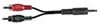
A Stereo RCA to 3.5mm Stereo cable |
| |
 |
|
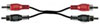
A Stereo RCA to Stereo RCA cable |
| |
 |
|
A Stereo RCA to 3.5mm Stereo adapter |
 |
|
USB plug |
|